When an item in this list is modified, the application file cache version for the site that contains this list MUST be updated.
MSDN
 overrideKeys = function () {
 /*This is a standard SharePoint Function, that listens to keyboard events*/
   window.OnListViewKeyDown = function OnListViewKeyDown(a, b) {
     var d = GetListContextFromContextNumber(String(b));
     if (d == null || d.inGridMode) return;
     var e = a.keyCode,
       c = a.shiftKey || a.ctrlKey;
     if (IsCallOutOn()) return;
           console.log(e);
     switch (e) {
       case Sys.UI.Key.del:
         //Oveeride Delete Button
         break;
       case Sys.UI.Key.up:
         SelectNextRow(b, -1, c, a);
         break;
       case Sys.UI.Key.down:
         SelectNextRow(b, 1, c, a);
         break;
       case Sys.UI.Key.enter:
         if (IsEventTargetAnchor(a)) return;
         if (a.target != null && !IsStrNullOrEmpty(a.target.className) && a.target.className.indexOf("ms-lstItmLinkAnchor") >= 0) OpenCallOutOrECB(b, a);
         else ListItem_Open(b, a)
           case Sys.UI.Key.esc:
                 //override Esc
                 brea;
     }
   }
 };
 $(function () {
   setTimeout(overrideKeys, 600);
 });


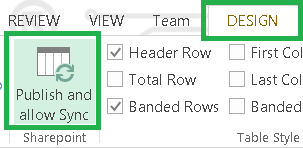 |
| Publish Sync button will appear only after installing Add-in for Excel 2007 |


 |
| This list was created right from Excel |
 |
| Select your Excel table and Synchronize with SharePoint in order to see the changes made in SharePoint or to send changes made from Excel to SharePoint list |
 |
| Beyond Deployment: How IT Can Inspire, Motivate And Drive Sustainable Adoption? |
